



 Help Center
 How to get help
How to optimise your Store Locator’s internal linking?
Table of contents
Creating local pages is one thing; linking them strategically is another matter. Without consistent internal linking, your outlets could become “orphan pages” and lose any SEO authority.
From breadcrumbs to contextual anchors, learn about the technical tweaks that will send algorithms (and your customers) to your door.
What is internal linking?
Internal linking refers to the technical and structural organisation of your Store Locator‘s pages and how they are connected via hypertext links. It’s thanks to these internal links that your local pages are directly connected to directory pages and the rest of your site.
They are crucial optimisation-wise, as without this network of links, a store page becomes an “orphan” page. Meaning? An orphan page is no longer powered by the site’s SEO authority – it’s like it doesn’t exist in the eyes of Google and other search engines.
Is internal linking important for conversational AI SEO?
In a nutshell, yes. Internal linking is a strategic must to grab the attention of conversational AI (Gemini, ChatGPT, Search GPT).
While Google simply indexes Store Locator pages, AI aims to map the entities behind these pages. Put another way, it won’t just look for repeated words in your text but try to understand who you are and how you’re connected to the rest of the world.
If your Store Locator’s internal linking is below par, AI will have an incomplete picture of your entity.
For example, AI doesn’t just want to know that you have a webpage that talks about bikes. It wants to confirm that you ARE a bike expert located in a specific location. Internal linking is like a piece of string that ties all the elements of a site together, cementing its credibility and increasing your chances of being recommended.
The different types of internal links
Always thought a link is just a link? Nothing could be further from the truth! Optimising internal links requires a solid understanding of your site’s architecture; it’s a vital non-negotiable element. These links form the spider’s web that connects your pages, and each one has a different purpose and benefit.
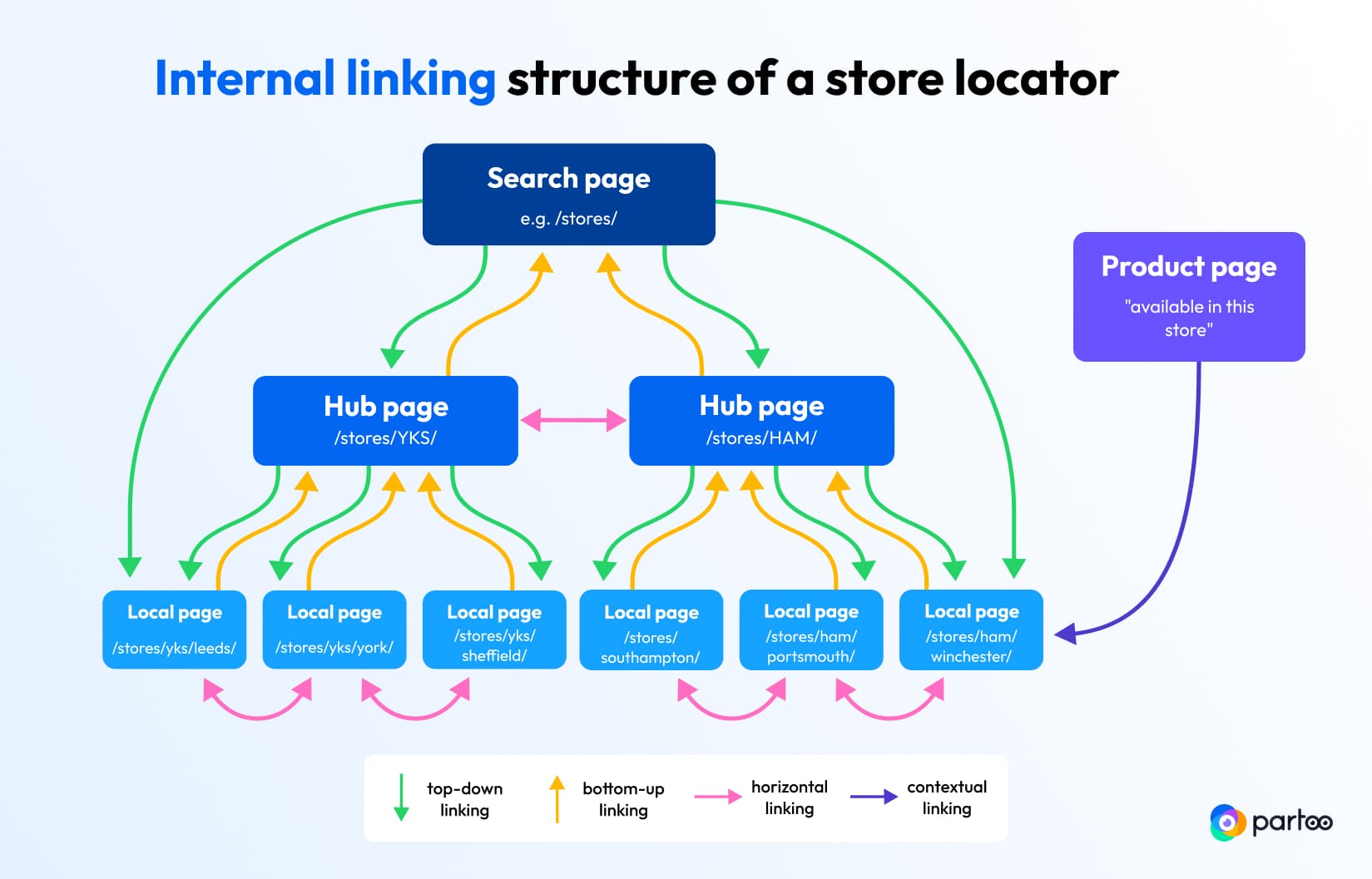
There are several types of connections between pages:
- Top-down linking: It links the main pages (home, navigation menu, site footer) to directories and store listings, ensuring each outlet can be found and indexed by search engines.
- Bottom-up linking: It typically uses breadcrumbs on local store pages to pass authority to higher categories (city, region) and confirm the site’s hierarchical structure.
- Horizontal (or transversal) networking: It connects store listings located in the same geographical area or ones that offer similar services to make navigation easier and strengthen local relevance.·
- Contextual linking: This means inserting links to your local pages within your written content, such as your product sheets or blog posts. It encourages visitors looking for a service or product on your site to pop into your physical store or establishment.
5 best practices to optimise your internal links
Your Store Locator’s internal links will usually integrated by the devs who set up your website, whether you create your site in-house or use an external service provider.
Here are some tips to help you assess if your Store Locator is well-optimised or if your tech team needs to fine tune it.
1. Use a clickable breadcrumb
This is the easiest and most effective way to improve internal linking. You should have a breadcrumb on each store listing, for example, Home > Our stores > Bath > Milsom Street. Make sure each element in the breadcrumb is a clickable link.
Thanks to these breadcrumbs, you allow authority (AKA SEO juice) to flow naturally from smaller pages to the main ones.
2. Integrate a “nearby stores” block
On each local page, insert a “nearby stores” block with a list of 3 or 4 nearby stores. This internal linking technique reinforces the local consistency of different pages, while helping users and crawlers to navigate their way around your site.
The trick is to use town or city names in the anchor of your links rather than simple “View” buttons. For example, “15 min away: our Truro store”.
3. Link your products to stores
Whether your site has an e-shop or just product sheets, you should add a hyperlink such as “Check availability at the [Brentford store]”.
This will support your web-to-store strategy by guiding visitors to physical stores while enhancing the SEO value of frequently visited product pages to boost your local pages.
4. Carefully select footer links
Website footers appear on all pages and are a powerful internal linking tool. So, it’s in your best interest to integrate links to your local pages to ramp up their SEO.
If you only have a few stores, it’s worth listing them all in the footer. If you have lots, then list the top 5 or 6 towns/cities (example: “Our stores in London, Manchester, Bristol, Cardiff, Glasgow…”).
As the footer appears on all pages, it’s a sure-fire way to promote your outlets to the widest audience. This optimisation ensures that Google finds your key pages in a single click, from any page on your website.
5. Use descriptive anchors
Paying attention to the anchor of your links, i.e. the words used for each hypertext link is also important. A common mistake is to use generic anchors like “Click here” or “View listing”.
SEO-wise, the anchor of your internal links should be descriptive and specific to the page in question. For a Store Locator, use geographic terms. For example, use an anchor like “Directions to get to our Newquay store” rather than just “Directions”. This tells AI and Google the subject and location of the landing page.
The local customer experience platform built for your network
Transform the customer experience across your businesses with AI
Stay one step ahead!
Download the 2026 Barometer on online presence and e-reputation of businesses and gain practical insights to increase your chances of being cited by AI.
Subscribe to our newsletter
Receive our best articles and practical guides directly in your inbox every month