



 Help Center
 How to get help
How to find the perfect local keywords for your business?
Table of contents
When it comes to getting your business found online, local keyword research is essential. It helps you reach a relevant audience within your geographical area.
This article shows you how to carry out the right local keyword research for your business, with concrete examples, handy tools and a step-by-step process for working them into your Google listing or website.
Why are local keywords important?
Local keywords are essential for small businesses, as search engines — Google in particular — are always trying to serve up relevant results to users. If you help the search engine understand which area you operate in, you’re more likely to be shown to the right users.
Using local keywords helps you:
- Increase your local visibility: local keywords help you reach an audience looking for a product or service in your area. They boost your visibility with potential local customers and are a real asset for your local SEO strategy!
- Stay competitive: by targeting local keywords, you go head-to-head with other local businesses — and even with national giants based nearby!
- Improve conversions: local searches are often carried out by users looking for services or products near them. Using local keywords can increase the likelihood that these searches lead to conversions.
How to activate your Google My Business listing
Phone, mail, video… discover the different ways to get your business listing verified, and how long it takes!
Local keywords vs. keywords: what’s the difference?
Local keywords are precise search terms used by internet users to find products and services in their area. Traditional keywords are broader and more general, whereas local keywords include specific information about your business’s location.

For example…
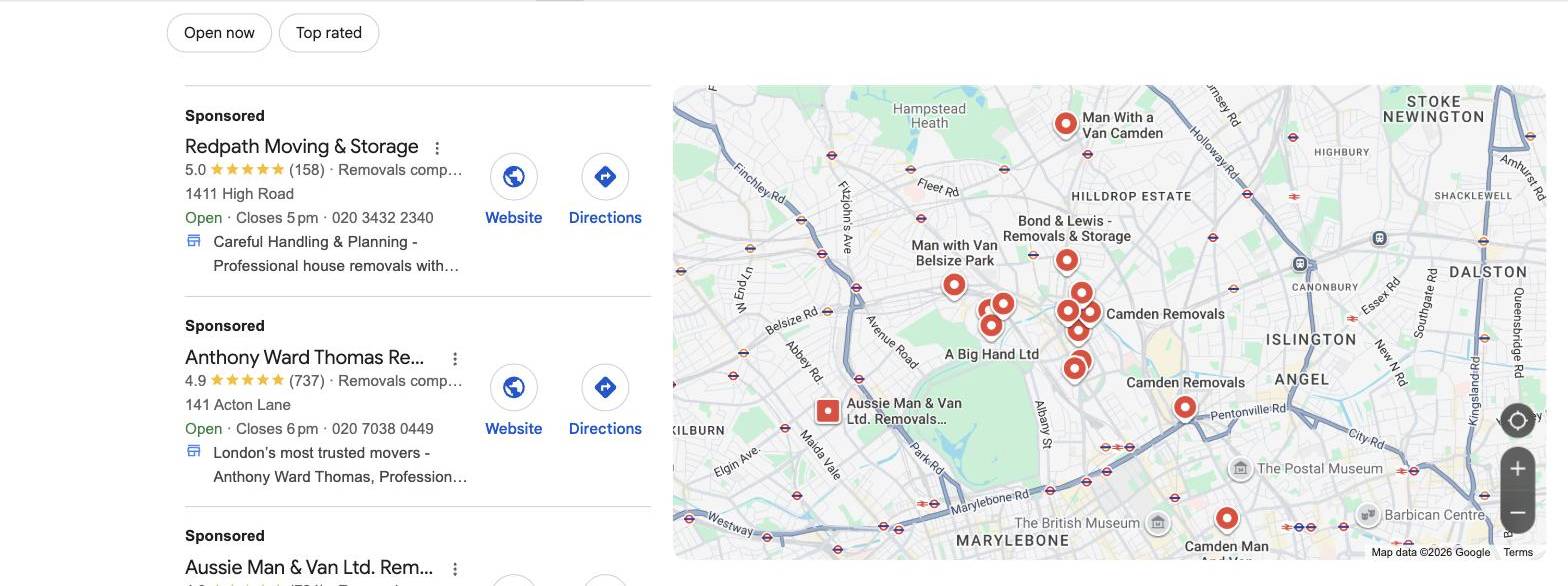
A traditional keyword might be “removal company”, whereas a local keyword would be “removal company London “.
A traditional keyword might be “removal company”, whereas a local keyword would be “removal company London “.
The main difference between the two is that a local keyword includes the name of the city, region or other geographic markers that help identify the user’s intent to find something in a specific place. Local keywords tend to be more targeted and appeal to a narrower audience.
How do you find the right local keywords?
Now that you understand why they matter, here’s how to carry out effective local keyword research and find the ones that best match your business.
List the services you offer
Before you even start your local keyword research, take some time to think about and write down a list of all the services your business offers. Keywords very often correspond to the services users need.
For example, a plumber might offer all of the following services:
- Unblocking drains;
- Boiler repair;
- Boiler installation;
- Boiler maintenance;
- Radiator installation…
Often, professionals only think of their main trade for their keyword (in this case, “plumber”). It’s true that people do search for a “plumber”, but many of them are also looking for more specific services they need. That’s why it’s essential to think about the services you offer as your starting point!
Define your coverage area
Now that you’ve listed the services that can be used as keywords, it’s time to think about how to mention your location.
Let’s go back to our earlier example: if you’re a plumber offering services in Strasbourg, you can add various geographic references, from the city’s general name to specific neighbourhoods. Your local keywords could be:
- Unblocking drains in Strasbourg;
- Boiler repair in the Neudorf neighbourhood;
- Boiler installation in Strasbourg-Centre…
Use online monitoring tools
There are some excellent online tools that can help with your local keyword research.
- Google Autocomplete: as you start typing a query into Google, this tool suggests autocompletions based on the most common searches. These suggestions can give you ideas for new keywords.
- Google Trends: this tool shows you which keywords have the highest search volume (i.e. the greatest number of searches). You can narrow the search down by area to get local data.
- Third-party tools: there are also paid tools such as SEMrush, Ahrefs and Moz that offer advanced keyword analysis, including local keyword research.
How do you use local keywords effectively?
Once you’ve drawn up a list of relevant keywords, it’s time to work them strategically into your online content.
Here’s how to go about it:
- On your Google My Business listing: improve your Google listing by including local keywords in your business description and other relevant sections such as “services”. This helps Google understand the type of service you offer and your competitive advantages.

Watch out
Don’t include local keywords in your Google listing name. Your listing name must accurately reflect your business name: Google can penalise, or even suspend, your listing if it detects keyword stuffing.
Don’t include local keywords in your Google listing name. Your listing name must accurately reflect your business name: Google can penalise, or even suspend, your listing if it detects keyword stuffing.
- On your website pages: naturally include local keywords on your homepage, in your blog posts and in your service descriptions to improve your website’s local SEO.
- In your webpage meta descriptions: optimise your meta descriptions with targeted local keywords to improve your click-through rate in search results.

3. In your image alt text: don’t overlook the alt text of the images you publish on your site. Describe your images using local keywords in the fields provided to strengthen your SEO strategy.
The local customer experience platform built for your network
Transform the customer experience across your businesses with AI
Continue reading ...
Google My Business keywords & why you should use them
Google My Business is the platform that simplifies complex marketing strategies when it comes to…

Google My Business : The Complete Guide to Your Local Listing
Google My Business is an essential tool for businesses wanting to develop their local listing…
How to create a Google My Business listing
Google My Business is a free tool Google provides, and it is easy to create….
Subscribe to our newsletter
Receive our best articles and practical guides directly in your inbox every month