




 Help Center
 How to get help
Structured data: how to use Schema Markup on your Store Locator?

Table of contents
Structured data helps search engine crawlers and artificial intelligence (AI) understand web pages. It’s a valuable tool to improve your local pages’ search result and recommendation rankings.
A well-designed Store Locator should include optimised Schema.org Markups: check out our comprehensive guide on how to fine-tune your structured data!
What is Schema.org Markup?
Schema.org Markup was created in the early 2010s by web giants such as Google, Bing, and Yahoo. The idea was to improve the indexing of website content by using standardised structured data.
All semantic tags and annotations have been grouped together on a single site (the famous Schema.org) to make things easier for devs. These are tags that are embedded into pages’ code and can’t be seen by users browsing a site.
The standard format recommended by Google is JSON-LD, a simple code block that’s inserted into pages’ headers.
Why use structured data on your Store Locator?
A Schema.org Markup directly affects the visibility of your Store Locator’s pages in local search results, on Google Maps and in GenAI searches.
We’re now well into 2026, a time when AI will automatically compare your site’s structured data with that of your Google Business Profile listing. If they’re the same, your AI credibility rating will soar! If the information doesn’t match, you’ll fade into the background.
Don’t forget, you must have a local page for each of your establishments. This is the only way for search engines and AI to effectively cite an outlet. Each page must contain key information (address, opening hours, store photos, website, services offered, customer reviews, etc.).
And it’s this information that must be structured with appropriate tags.
Here are two key examples for a store listing: the address (for the precise location) and the opening hours (for reliable open/closed times).
1. Address and geolocation structure
This is more than just a postal address; you need to provide the exact GPS coordinates so that AI can place a pointer for the outlet on a map.
Structured data breaks down each piece of information: street number and name, city, postcode, and country. The GPS coordinates provide the latitude and longitude.
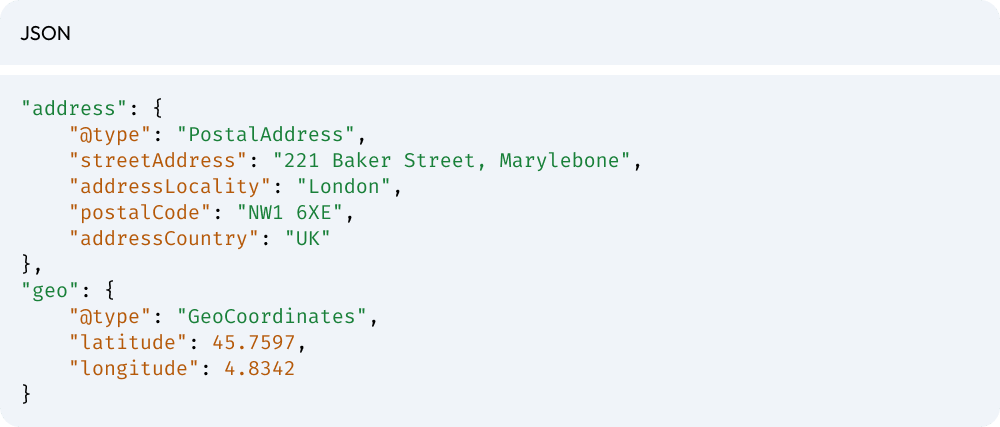
2. Opening hours’ structure
This markup allows search engines to display information such as “Open now” or “Closes soon” in search results. Your structured data will detail the opening and closing hours for each day of the week.
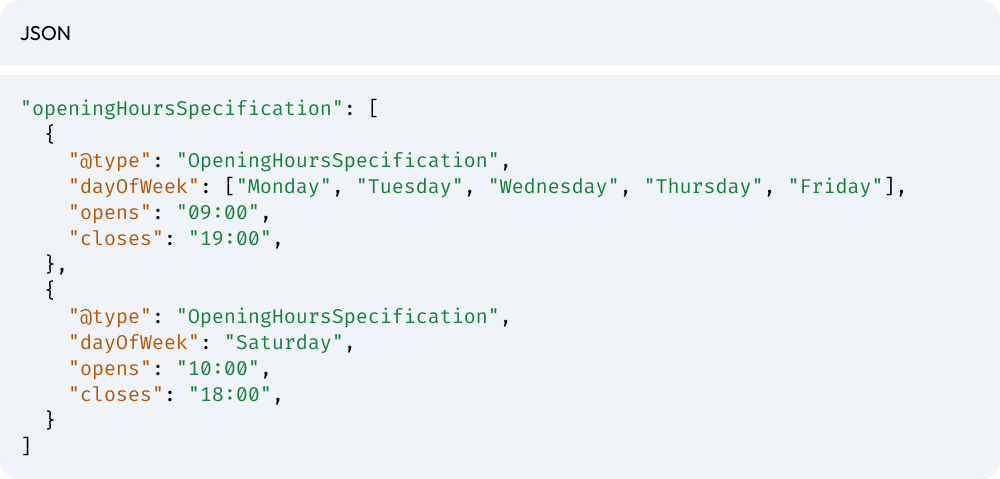
While your customers can’t see this structured data, algorithms will, meaning AI can instantly answer complex questions such as: “Shop open after 6 pm in London W2”.
Without these tags, it would “guess” the information in your text, which increases the risk of mistakes or missing details.
What structured data tags should you add?
We’ve used basic information such as the address and opening hours as an easy-to-grasp example. But what other information needs to be structured using Schema Markups? What are the must-have Store Locator tags, and which ones suit the specific needs of particular companies? To confirm that your Schema.org structured data has been set up, you can use the “Validator” tool on the official Schema Markup website.
The “LocalBusiness” tag, AKA your digital identity card
Think of this as the ‘parent’ tag. Without the LocalBusiness markup, your outlet won’t exist in Google’s eyes.
The great thing about this tag is that you can embed a lot of local information (name, opening hours, address, phone number…). Valuable information for effective local SEO.
What’s more, the LocalBusiness tag allows you to choose a sub-category according to your sector. A shop can select the “Store” category and then specify its speciality, such as “ClothingStore”.
Structured breadcrumb data or “Breadcrumblist”
Breadcrumbs are not just a useful navigation menu for internal links; they are also structured data that validates your geographical hierarchy.
The Breadcrumblist markup allows you to indicate how local pages are connected, for example, “Home > Stores > Region > City > Shop”. Adding this tag will ensure SERPs and GenAI recommendations display your Store Locator’s geographical information (country, region, department, city, etc.).
This markup helps Google understand that your store is part of a structured network. This boosts the authority of directory pages (Town/City or Region pages) and avoids orphan pages.
Other key markups
Other additional tags may be needed to further fine-tune your Store Locator:
- AggregateRating for your reviews: this tag allows you to display the famous yellow stars in the search results. This is the #1 lever to boost your click-through rate.
- ImageObject for your photos: This tag helps make it clear to AI that this is the “shop front photo” or “inside the store”. It also helps with Google Images’ SEO.
- sameAs for local coherence: This is the trust signal for all your official profiles (Google Business Profile, Facebook, directories). The sameAs tag tells AI that “this website”, “this Google listing”, and “this Facebook profile” refer to the same physical company. It is the anti-AI hallucination tool par excellence.
Specific markups
Depending on your industry and products and services you offer, other structured data tags may be useful to optimise your Store Locator.
- Department: If you have a concession (example: an optician’s concession in a hypermarket).
- AreaServed: To define your catchment area (example: “delivery within a 20km radius”).
- Service: For a precise list of services (example: “Bike repair”, “Parcel pick-up”).
- PriceRange: To show the product or service price ranges (£, ££, £££).
Need help with your Schema Markup and Store Locator’s local SEO? Partoo helps lots of stores and big brands set up their Store Locator. Get in touch now to discuss your web-to-store needs!

By Partoo
The local customer experience platform built for your network
Transform the customer experience across your businesses with AI
Stay one step ahead!
Download the 2026 Barometer on online presence and e-reputation of businesses and gain practical insights to increase your chances of being cited by AI.
Subscribe to our newsletter
Receive our best articles and practical guides directly in your inbox every month