



 Help Center
 How to get help
How to improve your Store Locator’s user experience (UX)?
 Written by Beatriz Sierra Sanchez
Table of contents
Getting to grips with your website’s user experience (UX) is a must in today’s digital ecosystem when everything happens at breakneck speed. And your Store Locator is the key link to bridge the gap between your website and your outlets, meaning it must be intuitive, seamless, and accessible to all, and across all digital media too.
In this article, we’ll look at the ways you can optimise your Store Locator’s UX to streamline the user journey and ramp up your web-to-store conversion rate!
Create a seamless, intuitive user journey
Also called “experience mapping”, the user journey means analysing and improving the overall experience visitors have when browsing your site. A well-designed user journey is simple, efficient, and tailored to each visitor’s needs.
The user journey aims to fully understand online users’ needs, so they find what they’re after with a single click, whether it’s directions to a store, to quickly book an appointment or easily check the availability of a product (in the case of a Product Locator).
Here are some surefire ways to improve your Store Locator’s user journey:
1. Identify and meet customers’ needs
Is the customer looking for the nearest store, the one with the widest choice, or one that opens late? The idea is to understand their expectations so you can create a customer-converting experience.
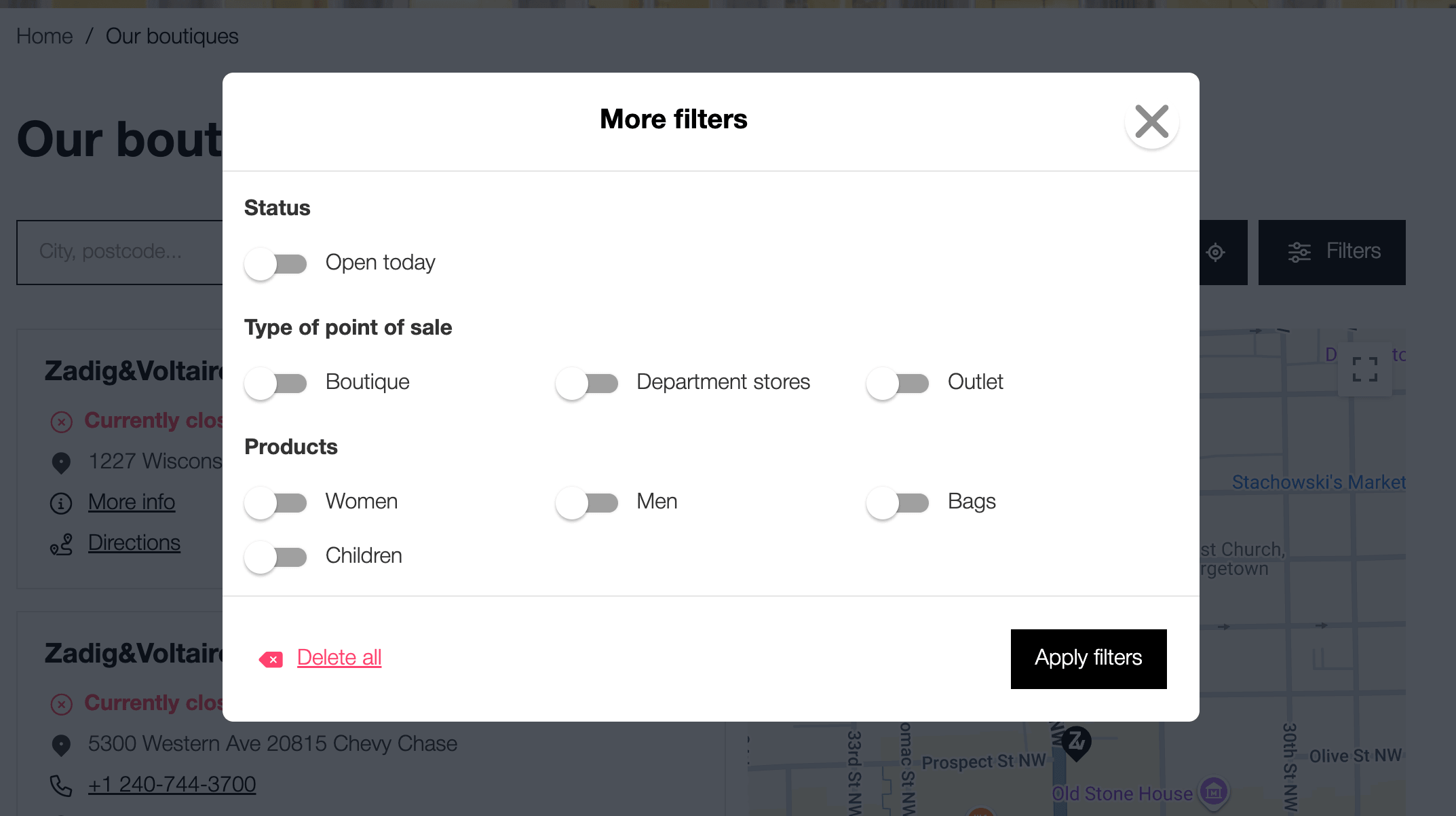
To do this, add optimised filters so users can sort results according to specific criteria:
- Real-time opening hours: open now, closes soon, etc.;
- Accessibility: disabled access, etc.;
- Services: Click & Collect, EV charging station, etc.
Once you understand users’ needs, you’ll be able to include the type of information they’re after.
2. Provide all necessary information
Once they’ve found your outlet, the user will need accurate info if you’re to drive them to your door.
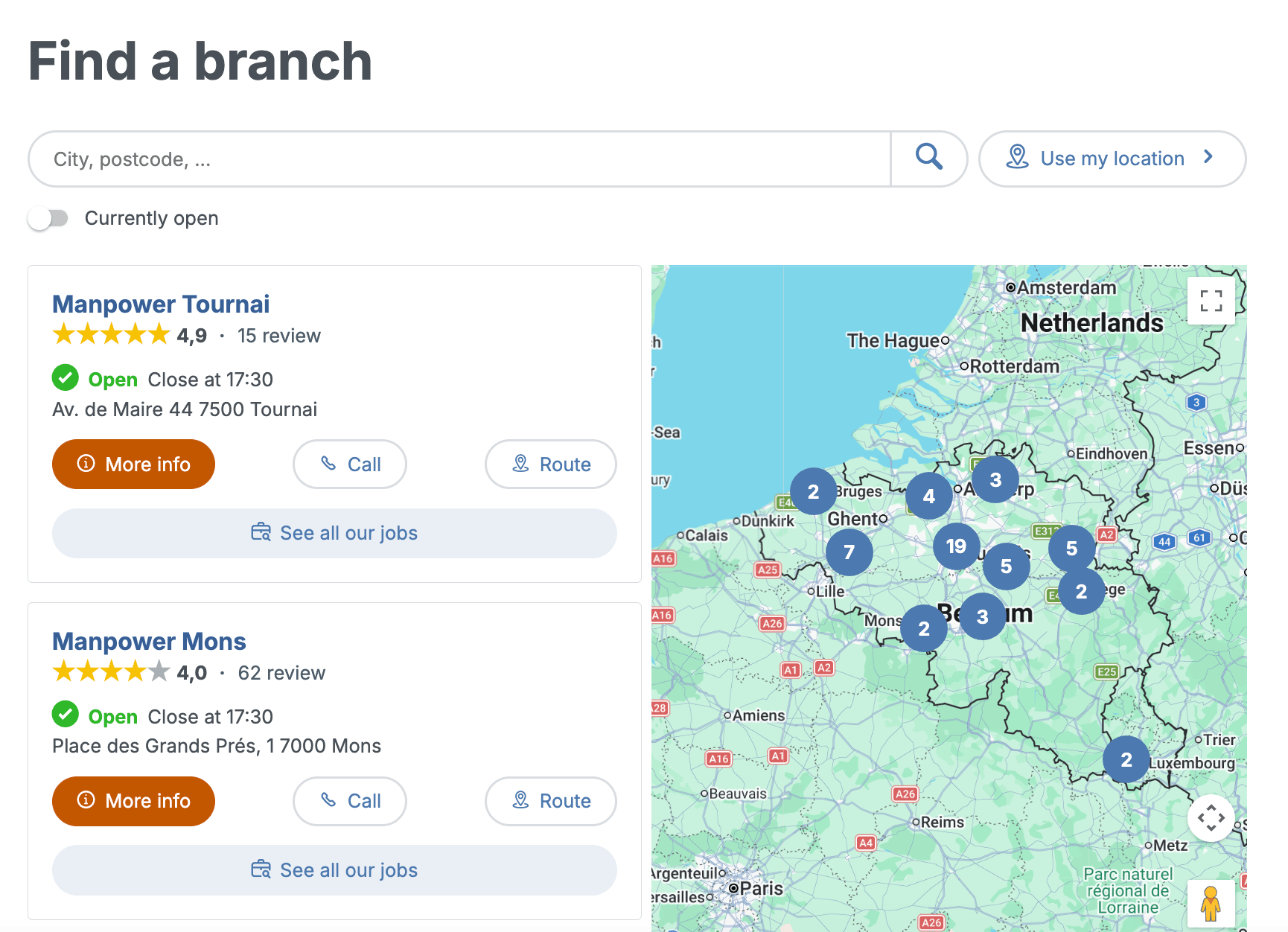
So, you need to clearly display all essential information:
- Contact details: name, store address, email, phone number, etc.;
- Detailed content: up-to-date opening hours (including public holidays), available services, and store photos;
- Social proof: include the store’s customer reviews to reassure users;
- Clear Calls to Action (CTAs): use push buttons like “Go,” “Call,” or “Make an Appointment”.
3. Tweak your Store Locator’s ergonomics
Ergonomics refers to how easily users can find their way around your site. To optimise it, you should remove any unnecessary steps or pain points, so customers can easily find the information they need.
To improve your Store Locator’s ergonomics, make sure it:
- Has a responsive design with an interface suited to all devices (smartphones, tablets, desktops) so users can seamlessly browse your Store Locator.
- Automatically detects the user’s location (via the navigator’s geolocation feature) to display the nearest results without the customer having to enter further details.
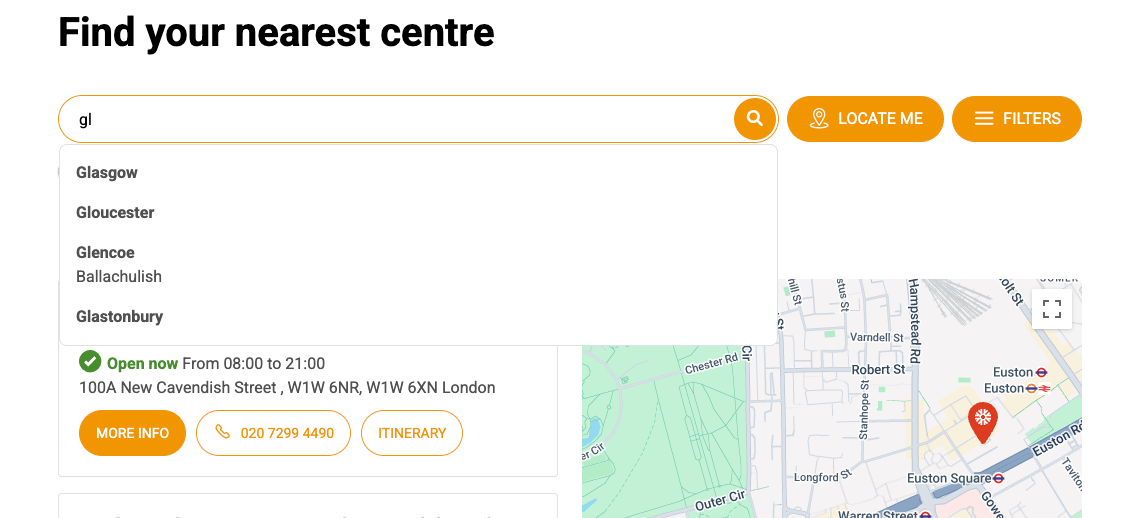
- Includes an autofill function in the search bar so users just need to tap in a few letters to find the nearest towns/cities or postcodes.
Prioritise digital accessibility
Digital accessibility measures how user-friendly your Store Locator is, namely suited to all devices and physical abilities (factoring in visual, motor, or cognitive impairments).
To ensure your digital accessibility is up to scratch, pay attention to:
- Hybrid displays
Map-only interfaces aren’t generally screen reader-friendly and are hard to browse without a mouse. You should include a button so users can switch from an interactive map (Google Maps or another version) to a list view. Tech-wise, structure this list using semantic HTML like <ul> and <li>.
This coding means screen readers can identify the results and clearly announce the number of stores available, for an orderly browsing experience.
*Software that renders a screen’s content in a non-visual way, usually by speech synthesis, but also in Braille or with sound icons. They’re essential for people who are visually impaired, have low literacy, or have learning disabilities.
- Visual comfort and contrast
Visual accessibility is based on optimal legibility, whatever the circumstances, whether for seniors, when browsing in direct sunlight, or for users with moderate visual impairment.
You should use fonts that are large enough (16px minimum) and ensure a sharp contrast between the text and the background. These measures are important to meet the official WCAG standards, which ensure that information remains accessible to all users.
Make sure your Store Locator meets the WCAG standards
Published by the W3C (World Wide Web Consortium), these international standards guarantee web accessibility for all, regardless of physical capabilities or the equipment used. By applying them to your Store Locator, you ensure an inclusive browsing experience.
Published by the W3C (World Wide Web Consortium), these international standards guarantee web accessibility for all, regardless of physical capabilities or the equipment used. By applying them to your Store Locator, you ensure an inclusive browsing experience.
- Editorial clarity
Smooth browsing requires simple language that won’t result in information overload. Use explicit terms and direct verbs to guide users through their journey.
Avoid technical jargon or tricky abbreviations that could confuse users. Help users immediately understand features by using clear labels on your buttons, such as “Make an appointment”, and adding text that explains pictograms.
- Keyboard-friendly browsing
Not everyone uses a mouse, so visitors should be able to browse by using their keyboard’s Tab key. Make sure you configure your Store Locator so the cursor moves logically, following the visual order of the page: search bar, filters, then the list of physical outlets.
Work on the Search Experience Optimisation (SXO)
SXO, AKA Search Experience Optimisation, is an SEO meets UX marketing technique. This concept combines search engine optimisation with UX strategies to improve the overall user experience on a site.
Effective SXO targets both search engines and users. In other words, if a page is user-friendly and meets the search intent, Google and GenAI engines will favour it.
Here are some tips to optimise your Store Locator’s SXO:
Most “near me” searches are on smartphones while users are on the go. Your Store Locator must be ultra-fast, responsive, and display large action buttons that are easy to tap with a thumb.
Search engines (traditional and GenAI) now need more than just keywords, as they analyse contents’ overall relevance. To do this, work on the content of your Store Locator’s search page, hub pages, and local pages (with complete descriptions, Google Posts, customer reviews, etc.) to improve your SEO authority.
This refers to the invisible language that lets algorithms instantly “understand” your information. It’s vital if you want to maximise your Store Locator’s SEO. By embedding structured data into each local page, you’ll give search engine bots all the info they need about your outlets.
Details matter if you want to improve your Store Locator’s user experience, from designing a seamless user journey to accessibility and SXO. By following our tips, you’ll be able to optimise your Store Locator while enhancing your online presence and increasing in-store traffic.
Localization Project Manager
The local customer experience platform built for your network
Transform the customer experience across your businesses with AI
Stay one step ahead!
Download the 2026 Barometer on online presence and e-reputation of businesses and gain practical insights to increase your chances of being cited by AI.
Subscribe to our newsletter
Receive our best articles and practical guides directly in your inbox every month