



 Help Center
 How to get help
September 16, 2026
Voice of Customer: the guide to listening and taking action with AI
Most businesses are already collecting Voice of the Customer data: Google reviews are piling up,…


Powered by Jim

Table of contents
Structured data Schema.org help search engine crawlers better understand Web pages. It’s a precious asset to help you improve the online visibility of your content in the search results. The same goes for your Store Locator: an efficient Store Locator includes an optimised Schema.org markup.
The web giants (Google, Bing, and Yahoo) created the Schema.org markup. Their objective was to improve the indexing of website content thanks to harmonised structured data. All the tags and the semantic markup have been clustered in a unique site to facilitate the job of webmasters. These tags are to be inserted in the code of the pages, they are invisible to the user on the concerned pages.
Schema.org offers many possibilities for creating “rich snippets” (prices, ratings, reviews, etc.) which then appear in the search results.
This will enrich the SERP and make your site more attractive to users.
Schema.org markup is very important for the visibility of your Store Locator store pages in the local search results. As a reminder, it is crucial to have a local page for each of your points of sale. Without them, you can neither accurately guide your potential customers from the SERPs, nor integrate Schema.org tags into your Store Locator.
Ideally, you should include the following two tags in your store pages:
They indicate the position of local pages in the site hierarchy. This can help users to better understand and explore your site. It’s also very important for local searches as the addition of this tag will allow your Store Locator’s geographical information (country, region, county, city…) to be highlighted in the SERPs.

It gives more information about your company to users. Choose a sub-category according to your sector of activity (“Dentist” for a dentist, “Store” for a shop…). Then you have the possibility to choose the speciality of the shop, for example “Clothing Store”.
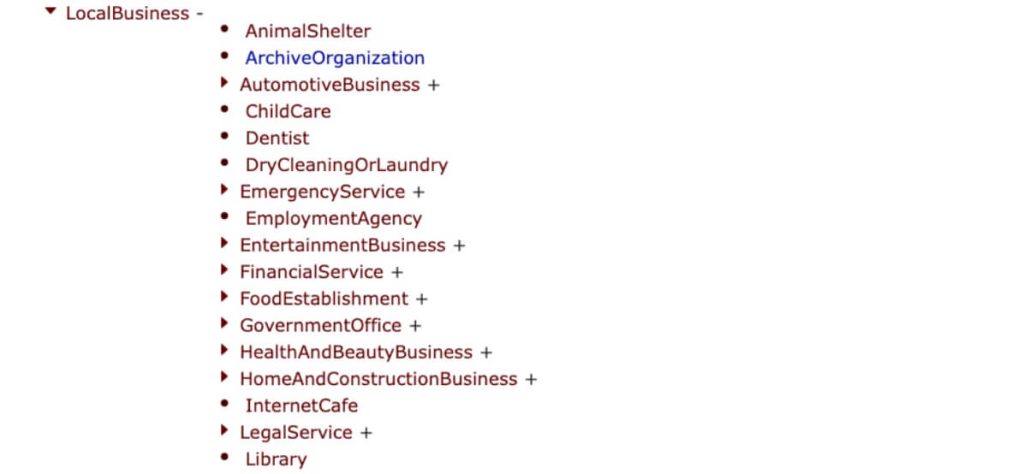
The main interest of this tag is that you can add a lot of local information (name, opening hours, address, phone number…). Valuable information for search engines.
To check that your Schema.org structured data has been set up correctly, you can use the “Validate” tool on the official Schema markup site.
To check that your Schema.org structured data has been set up correctly, you can use the “Validate” tool on the official Schema markup site.
Including Schema.org structured data in your Store Locator is therefore very important. In addition to making the search results more attractive, they are important for your store pages’ SEO.
Any questions or need clarity? Please do not hesitate to contact us. Our team of specialists have built Store Locators that meet market standards in all aspects.

Content Creator
Transform the customer experience across your businesses with AI
Download the 2026 Barometer on online presence and e-reputation of businesses and gain practical insights to increase your chances of being cited by AI.
Most businesses are already collecting Voice of the Customer data: Google reviews are piling up,…

While Artificial Intelligence is revolutionising plenty of things, some elements remain unchanged. The traditional stages…

A satisfaction survey sent at the right moment gets a higher response rate and more…
Receive our best articles and practical guides directly in your inbox every month